Slate resume template with a sidebar
A slate sidebar carries the photo, contact details, skills and languages. The main page stays white and dense.
Free, no credit card.
- When to pick it
- Handy when you have a lot of skills and languages to fit without making the resume longer.
- Industries
- Project management · IT · Logistics · Healthcare
Who this template is for
This template earns its place when you have a lot to fit: a long list of skills, three or four languages, certifications, and a career that already fills the page. Project management, IT, logistics, healthcare: fields that expect a precise inventory as much as a narrative. Moving the whole reference frame into the left column frees the main column for achievements, and avoids the two-page resume whose second page holds nothing but lists.
How the layout is built
Two permanent columns, but with a different width ratio from the executive template: the slate bar is narrower and the main page denser. On the left, the photo, your name, a Contact block, the skills and the languages. On the right, the target role, the summary, the experience and the education. The teal accent punctuates the sidebar labels and the section headings. Skills are stacked as small light tags on the slate background, with no rating bars or scores.
With or without a photo
The photo is on by default, at the top of the slate column, where the dark background sets it off with no extra frame. If you switch it off, the column starts on your name and stays legible: the layout does not depend on it, unlike the modern template’s header.
ATS readability
The sidebar is text, not an image or a table. The parser reads it first and then moves on to the main column, so your skills and languages arrive before your experience in the extracted flow, which is of no consequence for current tools. Writing language levels out in words rather than as dots is a choice made precisely to stay extractable.
PDF and Word export
The PDF is faithful, slate background included, and prints cleanly in black and white. In DOCX the column becomes a frame: the content is preserved and editable, but a very long skills list can overflow the height it was given. If you know the recruiter will reopen the file, trim the list to about ten entries before exporting.
Closest templates
If this one is not quite right, these three play in the same register.
All resume templates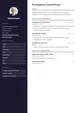
Executive
A dark sidebar gathers the photo, contact details and skills while the main column lays out achievements. EB Garamond headings set the measured tone expected at this level.
Modern
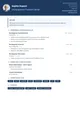
A two-column header with a photo, a midnight-blue accent and Raleway throughout. Contemporary without being loud.
Corporate
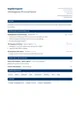
A header split across two columns, Merriweather headings and an institutional blue. Rigorous structure, corporate tone.
Ready to fill the Slate template?
Paste the posting, Jobtae rewrites your track record to answer it, then exports it in this template as PDF or Word.